![corsmed_no_clear_space_@16x-1.png]](https://help.corsmed.com/hs-fs/hubfs/corsmed_no_clear_space_@16x-1.png?height=40&name=corsmed_no_clear_space_@16x-1.png)
Use the Advanced tab
- Select a pulse sequence in the Pulse Sequences List.
- Open Set Parameters.
- Click the Advanced tab.
- Enable or disable the advanced options you want to use.
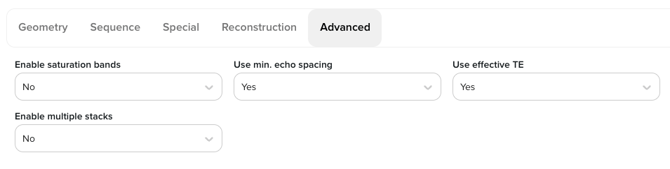
Advanced parameters
The parameters available in this section depend heavily on the selected sequence type.
RF duration
Duration of RF pulses in milliseconds.
Enable saturation bands
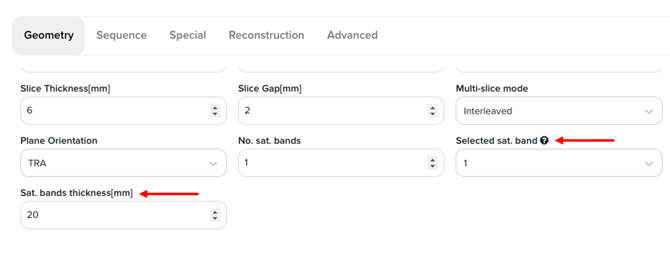
Allows the use of saturation bands; when enabled, the number and thickness of bands are configured in the Geometry tab.
GE: Sat Bands | Siemens: Saturation Regions | Philips: Sat Bands
To move and angulate saturation bands, hold the “s” key simultaneously with the left click on the mouse.
Use minimum echo spacing
Forces minimum echo spacing to replace effective TE.
Use effective TE
When disabled, minimum echo spacing replaces effective TE.
Enable multiple stacks
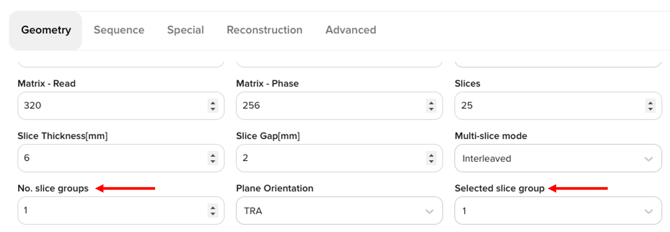
Enables acquisition using multiple slice stacks; when active, stack configuration becomes available in the Geometry tab - you can set number of stacks (no. slice groups), work independently on them by “selected slice group” and set number of slices and angulations per stack.
GE: Multiple Stacks | Siemens: Multi-Slab | Philips: Multi-Stack
Conclusion
You've learned how to find and use the Advanced tab, as well as how these settings map to common vendor terminology.