![corsmed_no_clear_space_@16x-1.png]](https://help.corsmed.com/hs-fs/hubfs/corsmed_no_clear_space_@16x-1.png?height=40&name=corsmed_no_clear_space_@16x-1.png)
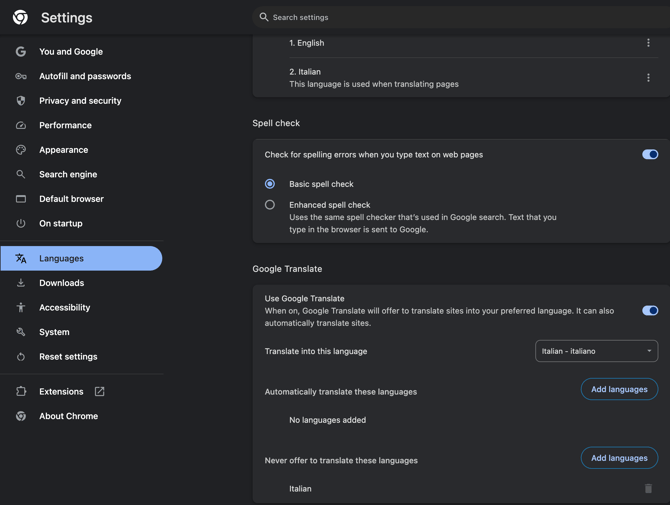
If your browser does not automatically offer translation, follow these steps in Google Chrome:
-
Open Chrome Settings.
-
In the left-hand menu, select Languages.
-
To the right of Translate into this language, add your local language in the drop-down menu (for example, Italian).
- Make sure translation is enabled for that language.
Once configured, a Google Translate icon should appear on the right side of your browser’s address bar.

Click the icon and select your local language to translate the Corsmed's pages.
For additional help or troubleshooting, refer to Google’s documentation: Google Support - Turn translation on or off