![corsmed_no_clear_space_@16x-1.png]](https://help.corsmed.com/hs-fs/hubfs/corsmed_no_clear_space_@16x-1.png?height=40&name=corsmed_no_clear_space_@16x-1.png)
Blue Indicator Box overview
The Blue Indicator Box is a real-time feedback panel in the Corsmed MRI Simulator that displays image quality and sequence performance metrics as you adjust parameters.
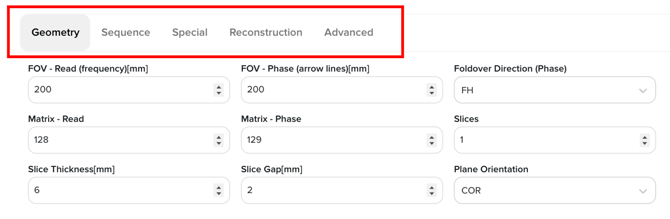
As you change parameter settings across the Geometry, Sequence, Special, Reconstruction, and Advanced tabs all metrics (with one exception explained below) update instantly.
This helps you understand how your parameter choices affect scan quality, safety, and efficiency just as they would on a real MRI scanner.
The simulator follows the same physical and mathematical principles that govern real MRI systems, allowing you to intuitively learn the trade-offs involved in MRI protocol design.
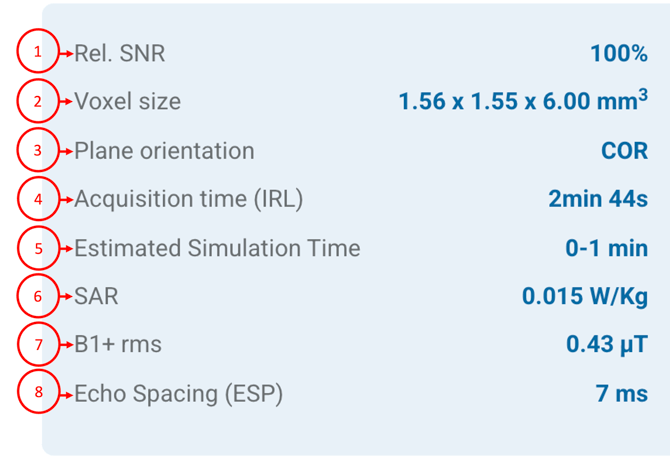
Blue Indicator Box metrics explained
1. Relative Signal-to-Noise Ratio (SNR)
Shows the signal strength relative to noise as a percentage.
This is a relative value used for comparison within the simulator, not an absolute SNR measurement.
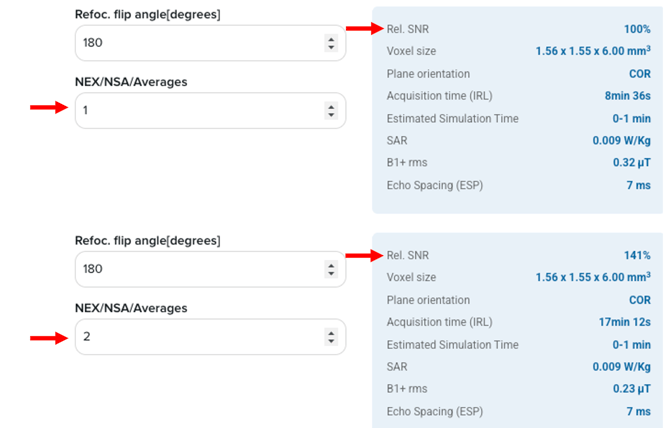
Relative SNR follows well-known MRI physics rules. For example, increasing the number of averages (NEX) improves SNR according to the square-root relationship.
2. Voxel Size
Represents the three-dimensional resolution of the image, determined by in-plane resolution and slice thickness.
- Smaller voxels → higher spatial resolution, lower SNR
- Larger voxels → higher SNR, lower spatial resolution
This highlights one of the core trade-offs in MRI.
3. Plane Orientation
This indicates the acquisition plane of the sequence (axial, sagittal, or coronal).
Although Corsmed does not offer a dedicated oblique plane option, slices can be angulated or obliqued.
When slice angulation is applied, the displayed plane orientation corresponds to the closest orthogonal plane, based on the degree of angulation.
Plane orientation influences anatomy visualization, slice coverage, and sometimes acquisition efficiency (depending on the selected geometry).
4. Acquisition Time (IRL)
This shows the real-life scan duration, calculated using the same timing relationships as a clinical MRI scanner.
It depends on parameters such as TR, number of slices, phase-encoding steps, averages, and acceleration techniques.
5. Estimated Simulation Time
This metric is specific to the Corsmed simulator and does not represent real MRI scan time.
Because Corsmed computes MR signal evolution pixel by pixel and through time, simulation time is primarily affected by:
- Number of slices
- Image resolution
It reflects computational effort rather than clinical acquisition duration.
Overall, the estimated simulation time is shorter than the actual computed acquisition time (as in real life), making learning and result analysis more efficient with the Corsmed MRI Simulator.
6. SAR (Specific Absorption Rate)
SAR indicates the RF energy deposited into the tissue, which is directly related to patient safety.
It increases with factors such as flip angle, RF pulse duration, and repetition rate, etc. and is governed by the same physical constraints as real MRI systems.
7. B1+rms
B1+rms represents the root-mean-square value of the transmitted RF magnetic field.
It is closely linked to SAR and provides additional insight into RF power usage and system load during a sequence.
8. Echo Spacing (Esp)
Echo spacing is the time interval between successive echoes in echo trains, particularly relevant in sequences like EPI or fast spin echo.
Shorter echo spacing reduces distortion and blurring but often requires higher gradient performance or bandwidth.
Learning MRI through real physics
Just like a real MRI scanner, Corsmed updates these metrics according to MRI physics and mathematical relationships. This allows you to directly observe how parameter changes affect image quality and acquisition behavior.
For example, a sequence with NEX = 1 may display 100% relative SNR.
If you increase NEX to 2, the relative SNR increases by approximately 41%, following the square-root law.
This behavior is not arbitrary, it’s pure MRI physics.
In summary
The Blue Indicator Box acts as a real-time feedback panel, helping you understand:
- Image quality trade-offs
- Scan time implications
- RF safety considerations
All while experimenting freely and safely in a physics-based MRI simulation environment.
Free vs. premium access
In the free version of Corsmed, Blue Indicator Box metrics update in real time based on a limited set of available parameters. This supports learning core MRI concepts but does not reflect the full complexity of clinical systems.
Advanced features such as:
- Parallel imaging
- Saturation bands
- Extended slice coverage
are not available in the free plan. As a result, some Blue Indicator Box metrics cannot fully mirror real-life MRI behavior.
To unlock the complete parameter set and experience a 1:1 simulation-to-real-life MRI workflow, including full control over acquisition acceleration, geometry, and advanced sequence features, we recommend upgrading to the Premium version of Corsmed.
Conclusion
You’ve learned what the Blue Indicator Box is, what each metric represents, and how to use it as real time feedback while adjusting MRI sequence parameters in the Corsmed MRI Simulator.