![corsmed_no_clear_space_@16x-1.png]](https://help.corsmed.com/hs-fs/hubfs/corsmed_no_clear_space_@16x-1.png?height=40&name=corsmed_no_clear_space_@16x-1.png)
Manage patient settings
- In the simulator header, click Patient settings.
- View the patient settings available for the anatomical model you selected.
- Adjust the patient settings you want, then click the X to close the panel when you’re done.
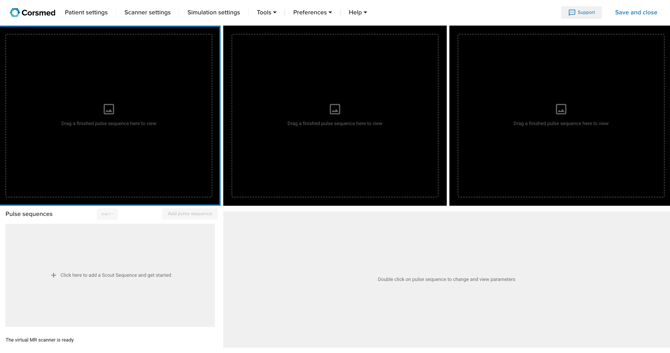
Available patient settings differ between models (for example, between brain and knee).
Available patient settings
Below are all patient settings that may appear depending on the selected anatomical model.
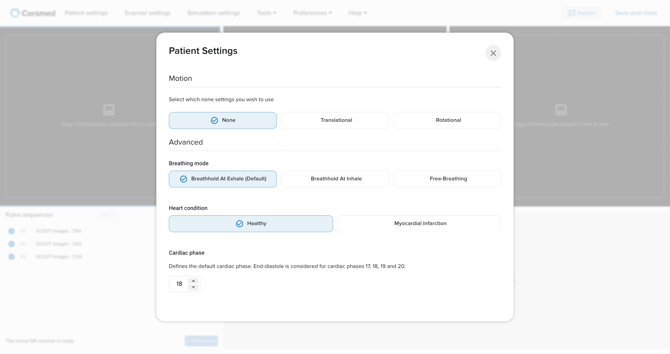
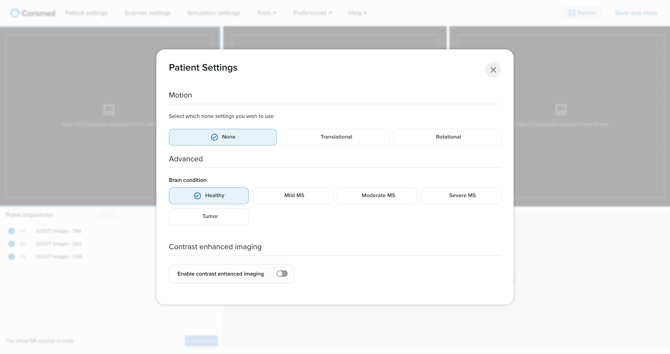
Patient motion
Change how the patient moves during the scan.
- None: no movement.
- Translational: linear movement (e.g., sliding or shifting).
- Rotational: rotating motion during the scan.
Breathing mode
Simulate different breathing states.
- Breath-hold at Exhale
- Breath-hold at Inhale
- Free-breathing
Heart condition
Available when using heart-related anatomical models.
- Healthy
- Myocardial Infarction
Cardiac triggering
Control how the scan synchronizes with the cardiac cycle.
- Cardiac Phase
Brain condition
Available when scanning the brain.
- Healthy
- Mild MS (Multiple Sclerosis)
- Moderate MS
- Severe MS
- Tumor
Conclusion
You've learned how to change patient settings in the Corsmed MRI Simulator and select the appropriate conditions for the anatomical model you’re working with.