![corsmed_no_clear_space_@16x-1.png]](https://help.corsmed.com/hs-fs/hubfs/corsmed_no_clear_space_@16x-1.png?height=40&name=corsmed_no_clear_space_@16x-1.png)
Duplicate a program
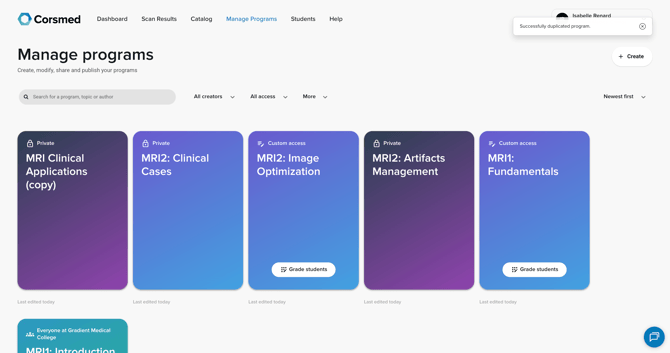
You can duplicate a program in two different ways, depending on where you are in the platform and what program you want to copy.
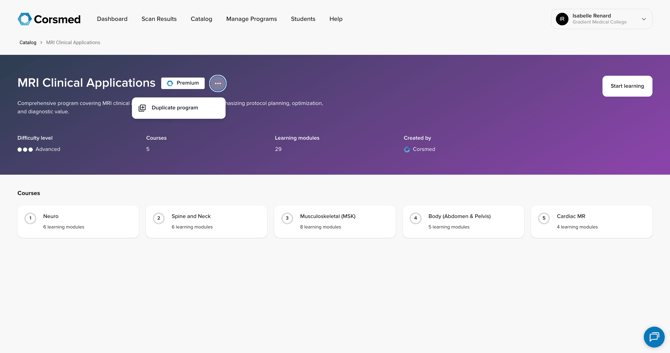
Option 1: Duplicate a program you haven’t created
- Go to Catalog.
- Click the program you want to copy.
- On the program overview page, click the three dots next to the program title.
- Select Duplicate program.
Option 2: Duplicate your own program
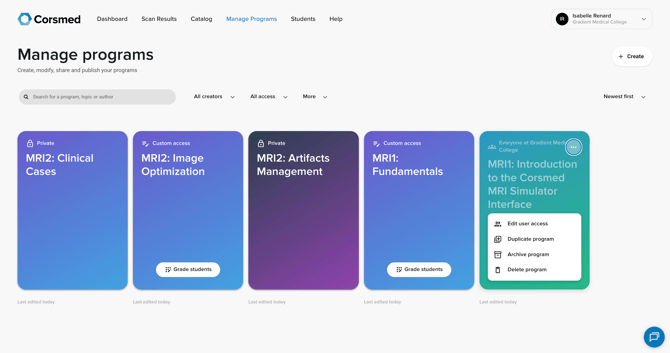
- Go to Manage Programs.
- Hover over the program you want to use as a starting point.
- Click the three dots on the program.
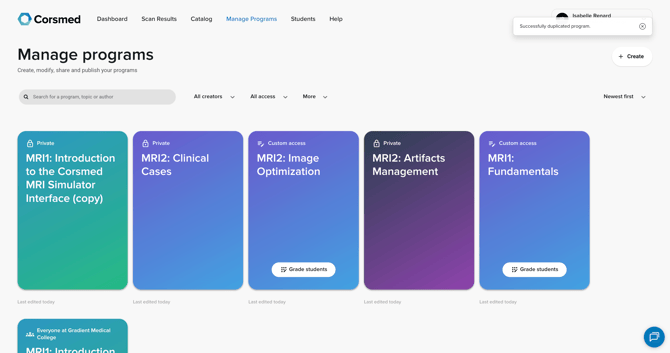
- Select Duplicate program.
Customize the duplicated program
- Find the duplicated program in Manage Programs.
- It will appear with the same name followed by (copy).
- Click the pen icon on the duplicated program to open it.
- Start customizing the content to fit your objectives.
Conclusion
You've duplicated a program and can customize the content to suit your learning goals and teaching needs.