![corsmed_no_clear_space_@16x-1.png]](https://help.corsmed.com/hs-fs/hubfs/corsmed_no_clear_space_@16x-1.png?height=40&name=corsmed_no_clear_space_@16x-1.png)
Use the Geometry tab
- Select a pulse sequence in the Pulse Sequences List.
- Open Set Parameters.
- Click the Geometry tab.
- Adjust the parameters you want to change.
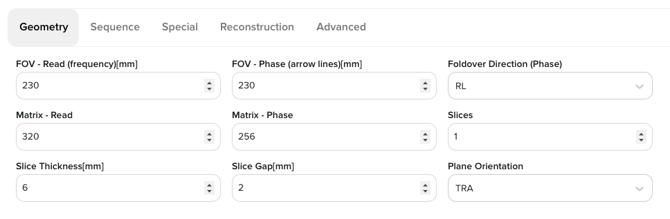
Geometry parameters
FOV – Read (Frequency) direction
Defines the field of view along the frequency-encoding axis.
GE: FOV Frequency | Siemens: FOV Read | Philips: FOV (Read)
FOV – Phase direction
Defines the field of view along the phase-encoding axis.
GE: FOV Phase | Siemens: FOV Phase | Philips: FOV (Phase)
Foldover direction (Phase)
Sets the phase-encoding direction to manage aliasing.
GE: Phase FOV Direction | Siemens: Phase Encoding Direction | Philips: Phase Direction
Matrix size – Read (Frequency)
Number of samples in the frequency direction, affecting spatial resolution and SNR.
GE: Frequency Matrix | Siemens: Base Resolution | Philips: Reconstruction Matrix (Read)
Matrix size – Phase
Number of phase-encoding steps, influencing resolution and scan time.
GE: Phase Matrix | Siemens: Phase Resolution | Philips: Reconstruction Matrix (Phase)
Number of slices
Total number of acquired slices. When more than one slice is selected, additional slice-management options become available.
GE / Siemens / Philips: Number of Slices
Slice thickness
Physical thickness of each slice.
GE / Siemens / Philips: Slice Thickness
Slice gap
Spacing between slices to reduce cross-talk.
GE: Spacing | Siemens: Distance Factor | Philips: Slice Gap
Plane orientation
Acquisition plane: transaxial (axial), sagittal, or coronal.
GE: Scan Plane | Siemens: Orientation | Philips: Slice Orientation
Multi-slice mode (visible when multiple slices are selected)
Defines the order in which slices are acquired:
- Sequential: slices are acquired in order.
- Interleaved: slices are acquired in an alternating pattern to reduce slice cross-talk.
GE: Slice Order | Siemens: Multi-slice Mode | Philips: Slice Ordering
Conclusion
You've learned how to find and use the Geometry tab, as well as how these settings map to common vendor terminology.