![corsmed_no_clear_space_@16x-1.png]](https://help.corsmed.com/hs-fs/hubfs/corsmed_no_clear_space_@16x-1.png?height=40&name=corsmed_no_clear_space_@16x-1.png)
Start on your dashboard
When you log in, you land on your Dashboard, the main hub where you can move to any part of the platform.
Dashboard sections
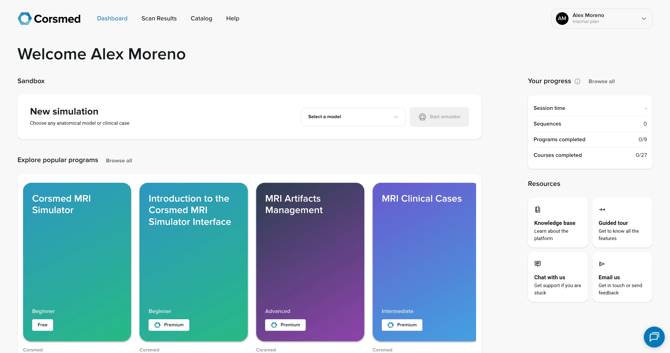
Sandbox
- Click here to start a simulation and access the Corsmed MRI simulator.
Your active programs
- Continue learning in the programs you’ve already started.
Programs from your institution
- Browse programs created and shared by your institution.
Corsmed programs available to you
- Explore additional programs offered by Corsmed.
Your progress
-
Track key learning stats:
- Session time: shows your total time spent in simulation sessions.
- Sequences: count the successful experiments you have completed.
- Programs completed: appear as X/Y, where X is completed items and Y is the total available to you.
- Courses completed: appear as X/Y, where X is completed items and Y is the total available to you.
Resources
- Get help whenever you need it. Choose:
- Knowledge base: information about the platform
- Guided tour: a walkthrough for new or returning learners
- Chat or email: reach out for support
View your scan results
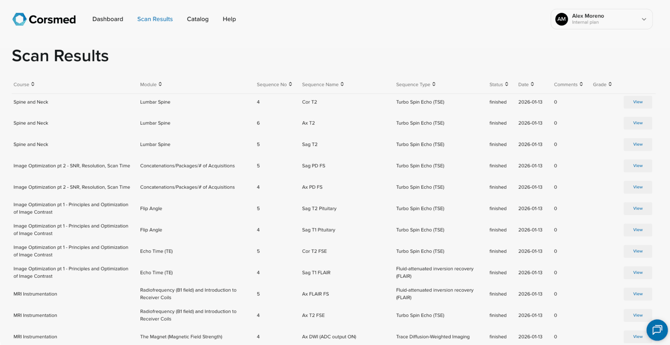
- Click Scan Results to see all simulator scans you’ve completed.
- For each scan, you can view:
- Course: the course the scan belongs to
- Module: the module where it was completed
- Sequence No: where this scan appeared in your sequence
- Sequence type: the type of sequence you used
- Status: finished or cancelled
- Date: when you completed the scan
- Comments: feedback from your instructor
- Grade: the grade you received
- View: open and review your scan
Browse programs in the catalog
- Click Catalog to explore all programs available to you. Programs are organized into the following sections:
- Popular: commonly taken or recommended programs
- All programs: browse, search, and filter by author or difficulty level
- Programs from your institution: programs created and shared by your organization
- Programs from Corsmed: additional programs offered by Corsmed
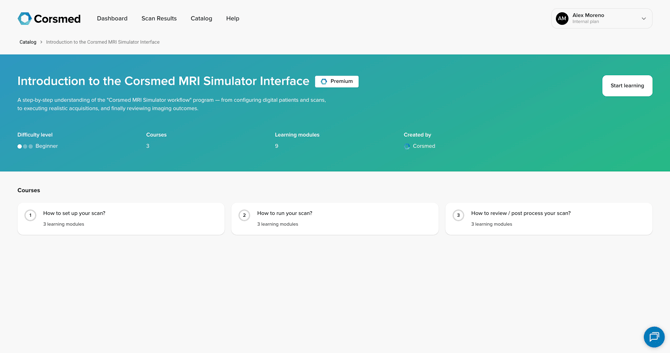
- For each program, you can see:
- Percentage completed (only shows if you’ve started the program)
- Difficulty level
- Green: Beginner
- Blue: Intermediate
- Purple: Advanced
- Number of courses
- Number of learning modules per course
- Tier (Premium or Free)
- Click Start learning to start a program.

Help
- Click Help in the navigation bar.
- You’ll be directed to the Knowledge Base for articles and guidance.
Conclusion
You've learned how to navigate the platform and find everything you need across the Dashboard, Catalog, and My Scan Results.