![corsmed_no_clear_space_@16x-1.png]](https://help.corsmed.com/hs-fs/hubfs/corsmed_no_clear_space_@16x-1.png?height=40&name=corsmed_no_clear_space_@16x-1.png)
Understand the structure
A program contains courses, and each course contains modules.
This structure helps you organize learning content and guide learners through a clear progression.
Learning overview
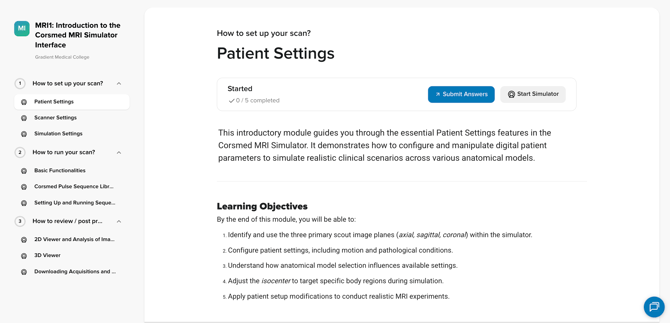
On the learning page of a program, you’ll see two main sections:
- Learning content
- Program sidebar
Learning content
- View the module title, description, and learning objectives.
- See how many submissions are expected and how many you’ve (as a learner) already completed.
- Click Start Simulator when you’re ready to start scanning for an assignment.
- Click Submit Answers when you’re ready to submit your completed assignments.
- Your work is auto-saved as you move through the content.
- Look for brief pop-ups confirming your progress is saved.
- As you scroll, the footer always shows:
- Your submission progress
- A Submit Answers button
- The option to Start Simulator
Program sidebar
- View the program name at the top.
- Click a course to expand it and view its modules.
- As a learner complete modules, they’ll see:
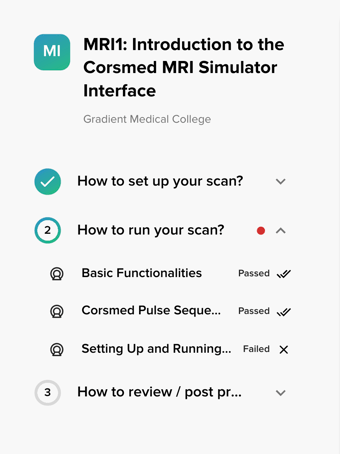
- completed module: the progress circle next to the course fills up.
- red dot: one or more modules have been failed.
- checkmark: all modules are completed and passed.
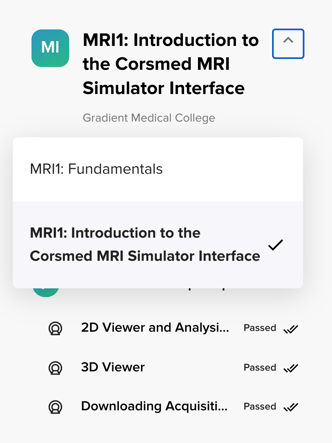
- To switch programs, click the program name in the sidebar and select another.
An eye with a line through it icon means the content is locked for your learners.
Communicate to learners when the content will become available and update user access settings accordingly.Conclusion
You've learned how programs, courses, and modules are structured, and have viewed the learning experience through your learner’s eyes. This enables you to create well-structured content and support learners effectively as they progress through it.