![corsmed_no_clear_space_@16x-1.png]](https://help.corsmed.com/hs-fs/hubfs/corsmed_no_clear_space_@16x-1.png?height=40&name=corsmed_no_clear_space_@16x-1.png)
Access the Pulse Sequence Libraries
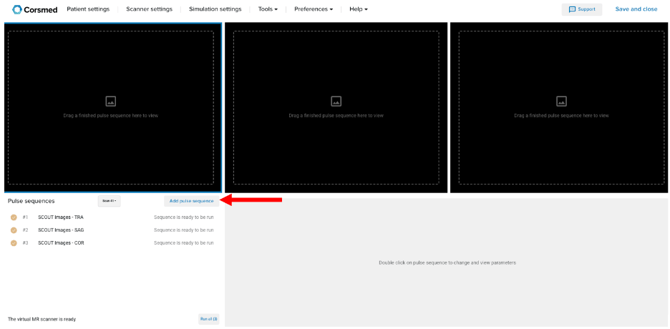
- Open the Corsmed MRI Simulator.
- Click Add pulse sequence in the Pulse Sequence List.
You will now see the available pulse sequences and protocols.
Understand the Pulse Sequence Libraries
The Pulse Sequence Libraries provide a structured way to work with MRI sequences and protocols for learning, teaching, and experimentation.
Which libraries you can access, and whether you can edit their content, depends on your account type and license, but the structure is the same for all users.
The simulator includes five main library categories:
-
Standard Sequences
Raw pulse sequences that require parameter adjustments to achieve the desired image weighting.
-
Standard Protocols
Preconfigured protocols that can be run as-is or modified before running.
-
Personal Library
Sequences and protocols you’ve created yourself. These are private to you and can be edited before running.
-
Course-Specific Library
Sequences and protocols created by the course instructor specifically for that course.
-
Module-Specific Library
Sequences and protocols created by the module instructor specifically for that module.
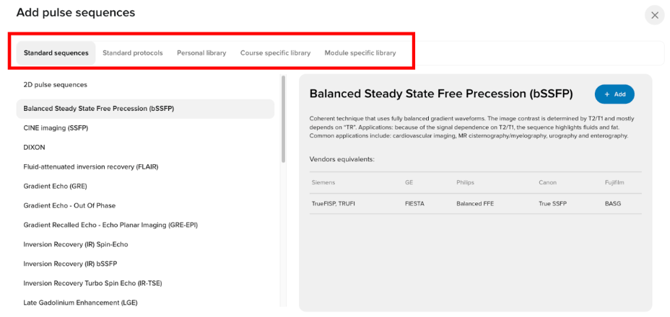
Together, these libraries let you move seamlessly from generic pulse sequences, to anatomy-specific protocols, and finally to customized educational or personal workflows.
Conclusion
You’ve learned what the Pulse Sequence Libraries are, how to access them, and how each library type supports different learning and workflow needs in the Corsmed MRI Simulator.