![corsmed_no_clear_space_@16x-1.png]](https://help.corsmed.com/hs-fs/hubfs/corsmed_no_clear_space_@16x-1.png?height=40&name=corsmed_no_clear_space_@16x-1.png)
How It Works
There are three sensitivity levels: Low, Normal, and High.
Each level applies predefined grading settings across all parameters (such as center, orientation, field of view, resolution, etc.), which allow you as a teacher to determine how lenient the grading is.
The key principle is simple: for the same mistake, a lower sensitivity level will result in a higher grade than a higher sensitivity level. In other words, low sensitivity is more forgiving, and high sensitivity is more demanding.
The Three Levels
Low sensitivity — lenient grading. Small deviations across parameters have little impact on the score. Good for introductory exercises where you want students to build confidence.
Normal sensitivity — balanced grading. A moderate standard that penalizes clear errors while still allowing for minor imprecision.
High sensitivity — strict grading. Even small errors are penalized more heavily. Best suited for advanced exercises where precision is expected.
Example
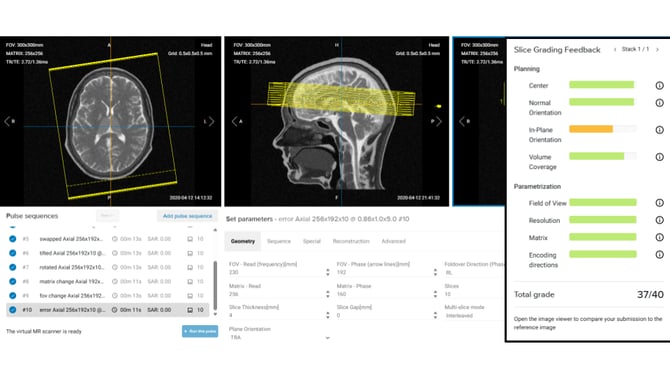
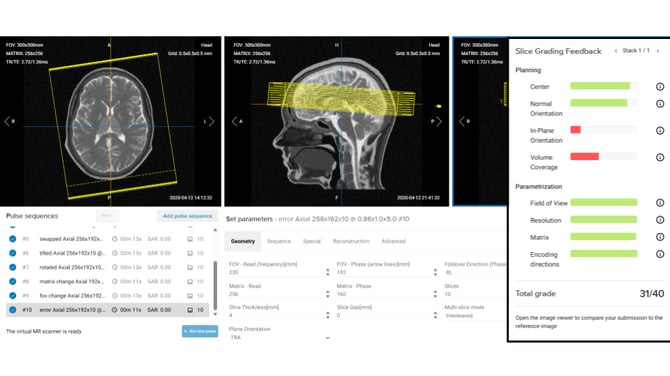
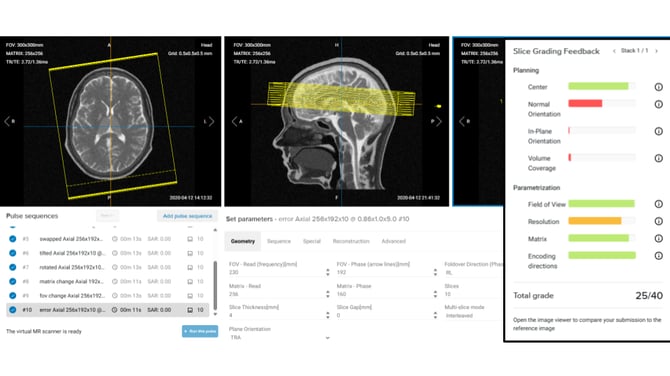
To illustrate the difference, here's how the same submission with several errors across different parameters scores at each sensitivity level.
Low sensitivity
Normal sensitivity
High sensitivity
 Choosing the Right Level
Think about where your students are in their learning journey. For early-stage practice, a lower sensitivity level lets students focus on the overall workflow without getting discouraged by small errors. As they progress, raising the sensitivity level helps them develop the precision required in a real clinical setting.
Summary
Sensitivity levels give you control over how strictly the automatic grading assesses your students. You can choose sensitivity across three levels: Low, Normal and High. By matching the sensitivity level to your students' experience, you can use automatic grading as a tool that supports learning at every stage.