![corsmed_no_clear_space_@16x-1.png]](https://help.corsmed.com/hs-fs/hubfs/corsmed_no_clear_space_@16x-1.png?height=40&name=corsmed_no_clear_space_@16x-1.png)
Use the Sequence tab
- Select a pulse sequence in the Pulse Sequences List.
- Open Set Parameters.
- Click the Sequence tab.
- Adjust the parameters you want to change.
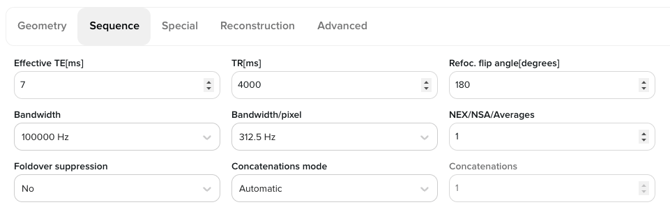
Sequence parameters
Effective TE (TE)
Time between RF excitation and echo formation, influencing image contrast.
GE / Siemens / Philips: TE
Repetition Time (TR)
Time between successive excitations of the same slice.
GE / Siemens / Philips: TR
Refocus Flip Angle
Flip angle of refocusing pulses, particularly important in FSE/TSE sequences.
GE: Refocus Angle | Siemens: Refocusing Flip Angle | Philips: Refocusing Angle
Bandwidth
Receiver bandwidth, affecting SNR, chemical shift, and distortion.
GE: Bandwidth | Siemens: Receiver Bandwidth | Philips: Bandwidth
Bandwidth per pixel
Bandwidth normalized per pixel; useful for understanding distortion behavior.
GE: BW/Pixel | Siemens: Pixel Bandwidth | Philips: Bandwidth per Pixel
NEX / NSA / Averages
Number of signal averages; increases SNR following the square-root relationship.
GE: NEX | Siemens: Averages | Philips: NSA
Foldover suppression
Reduces aliasing from anatomy outside the field of view.
GE: No Phase Wrap | Siemens: Anti-Aliasing | Philips: Foldover Suppression
Concatenations mode (visible when multiple slices are selected)
Controls how slices are grouped and acquired across TR periods:
- Automatic: Corsmed selects the most efficient number of concatenations based on the number of slices and the selected TR.
- Manual: allows direct input of the number of concatenations.
GE: # of Acquisitions | Siemens: Concatenations | Philips: Packages / Shot Mode
Conclusion
You've learned how to find and use the Sequence tab, as well as how these settings map to common vendor terminology.