![corsmed_no_clear_space_@16x-1.png]](https://help.corsmed.com/hs-fs/hubfs/corsmed_no_clear_space_@16x-1.png?height=40&name=corsmed_no_clear_space_@16x-1.png)
Open achievements
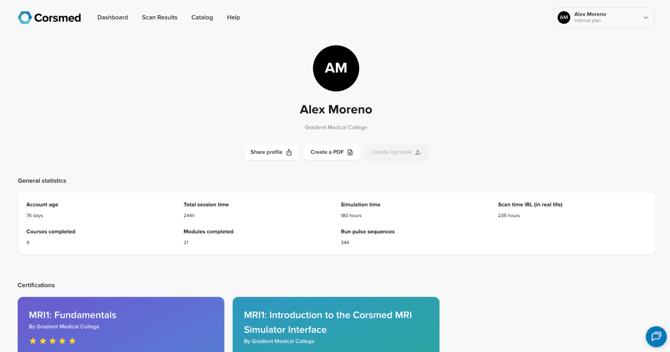
- Go to your profile from the Dashboard.
- Select Achievements.
- Click Share profile.
Choose what to show on your profile
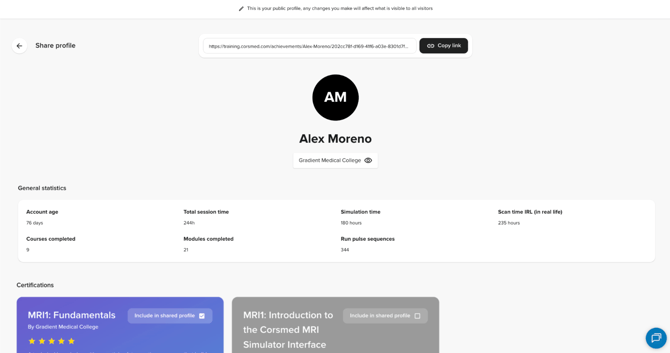
- Review the certificates listed in the sharing view.
- Click Include in shared profile to select or unselect each certificate:
- Check the box to include it.
- Uncheck the box to remove it.
Only the certificates you select will be visible on your Corsmed profile.
Copy and share your profile link
- Click Copy link to copy your Corsmed profile URL.
- Share the link anywhere you like.

Ways to share your Corsmed profile
- Send it to an institution or employer via email
- Share it on social media
- Add it to your digital portfolio or personal website
This is a public link that never expires, and allows anyone to easily verify the certifications you’ve earned on Corsmed.
What others will see
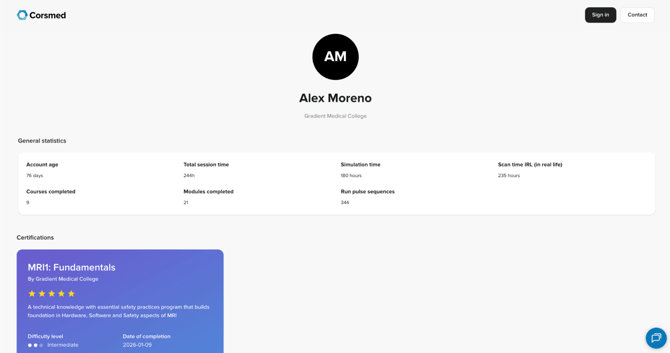
When someone opens your shared Corsmed profile, they’ll see your selected certifications and achievements in a clean, read-only view.
Conclusion
You've learned how to share your Corsmed profile, choose which certifications to display, and use your public link to showcase your accomplishments.