![corsmed_no_clear_space_@16x-1.png]](https://help.corsmed.com/hs-fs/hubfs/corsmed_no_clear_space_@16x-1.png?height=40&name=corsmed_no_clear_space_@16x-1.png)
Use the Special tab
- Select a pulse sequence in the Pulse Sequences List.
- Open Set Parameters.
- Click the Special tab.
- Adjust the settings you want to change.
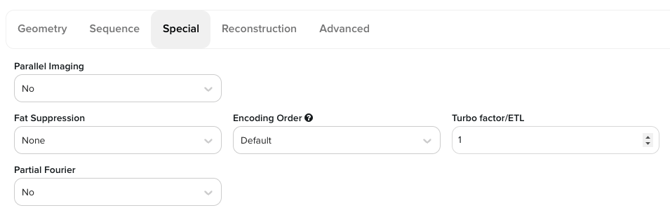
Special parameters
Parallel Imaging
Enables accelerated acquisition and displays the acceleration factor.
GE: ASSET/ARC | Siemens: mSENSE/GRAPPA | Philips: SENSE/GRAPPA
Fat suppression
Suppresses fat signal using spectral methods or inversion recovery pulses.
GE: FatSat / STIR | Siemens: Fat Sat / IR | Philips: SPIR / SPAIR / STIR
Fat sat Inversion Time (available when Fat suppression is set to IR pulse)
Timing for the applied Inversion Recovery Pulse
GE / Siemens / Philips: TI (inversion time)
Encoding order
Defines k-space filling strategy (default, centric, reversed-centric, reversed).
GE: Phase Encoding Order | Siemens: K-space Ordering | Philips: Profile Order
Turbo factor / ETL
Number of echoes acquired per TR in fast spin echo sequences.
GE: ETL | Siemens: Turbo Factor | Philips: TSE Factor
Partial Fourier
Acquires partial k-space to reduce scan time - if Parallel Imaging is set to SENSE or GRAPPA, this parameter becomes unavailable.
Options include phase-conjugate (half-Fourier), read-conjugate (partial echo), or off.
GE: Fractional NEX | Siemens: Partial Fourier | Philips: Halfscan
- Partial Fourier factor (available when Partial Fourier is set to phase-conjugate or read-conjugate) - set from 0.6 to 1
Conclusion
You've learned how to find and use the Special tab, as well as how these settings map to common vendor terminology.