![corsmed_no_clear_space_@16x-1.png]](https://help.corsmed.com/hs-fs/hubfs/corsmed_no_clear_space_@16x-1.png?height=40&name=corsmed_no_clear_space_@16x-1.png)
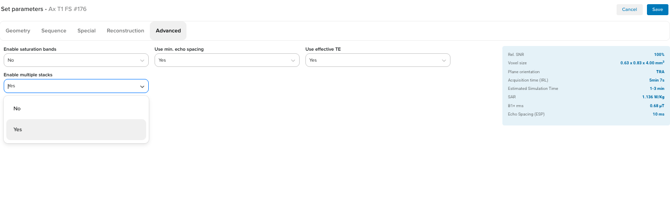
Enable multistack imaging
- Select the pulse sequence you want to use multistack imaging with.
- Open the Advanced tab in the Parameter box.
- Set Enable multiple stacks to Yes.
Set up slice groups
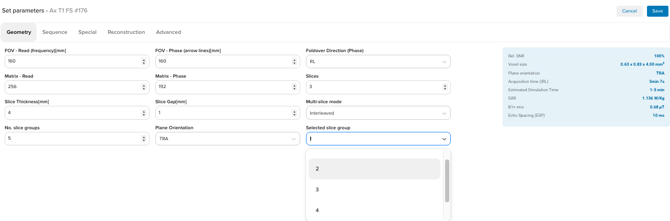
- Open the Geometry tab.
- Choose how many slice groups you want to create in No. slice groups.
- Review the Plane Orientation for the selected slice group. Choose:
-
- COR
- SAG
- TRA
The numbering of slice groups starts at 1, no matter how many you add.
Configure each slice group
- Select the slice group to work with under Selected slice group.
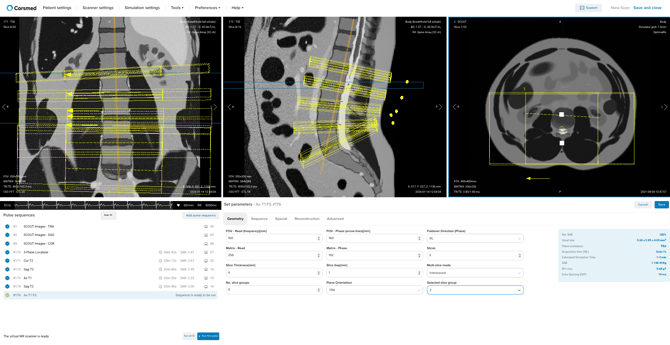
- Adjust slice position and orientation as needed.
- When you’re ready to configure another slice group:
- Change the Selected slice group.
- Recheck the Plane Orientation before continuing.
- Move and rotate the slices freely.
- Each slice group is independent of the others and can have its own angle and position.
Save and run the sequence
- Click Save when you’re done configuring all slice groups.
- Click Run to execute the pulse sequence.
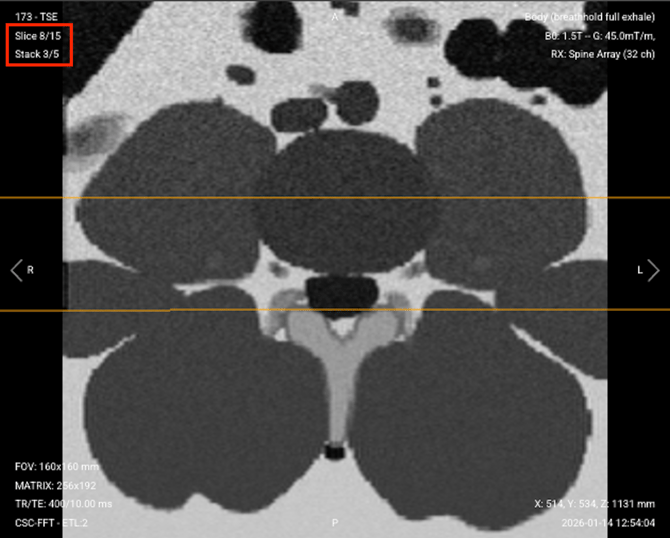
Resulting multi-stack acquisition. When you inspect the images you can see the progression of the slice number within the stack number of interest
Conclusion
You've learned how to use multistack imaging to create multiple slice stacks with independent orientations in a single scan.