![corsmed_no_clear_space_@16x-1.png]](https://help.corsmed.com/hs-fs/hubfs/corsmed_no_clear_space_@16x-1.png?height=40&name=corsmed_no_clear_space_@16x-1.png)
Open your program
- Go to Catalog.
- Select the program where you received grade and feedback.
Review your results by module
- Open each module to see your completed assignments.
- View whether you passed or failed the module.
- If your instructor has enabled multiple attempts, you can start a new one by clicking New Attempt.
- Check how many points you received out of the total possible points.
- Review each question to compare your answers with the correct ones.


Read your instructor's feedback
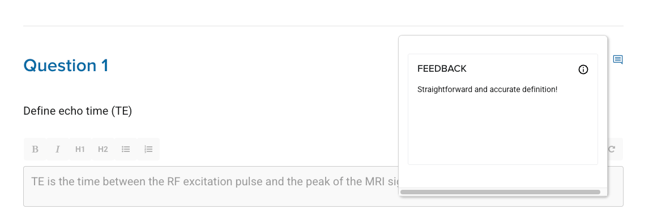
- Look for the comment icon next to each question.
- Click the icon to read any written feedback your instructor has provided.
Conclusion
You've learned how to find your grades and read your instructor’s feedback for each module in your program.