![corsmed_no_clear_space_@16x-1.png]](https://help.corsmed.com/hs-fs/hubfs/corsmed_no_clear_space_@16x-1.png?height=40&name=corsmed_no_clear_space_@16x-1.png)
Not all clinical cases support Multi-Planar Reconstruction (MPR). MPR is only available in cases where the original protocol includes a 3D acquisition, because MPR reconstruction is derived directly from that volumetric dataset. Cases acquired exclusively with 2D sequences do not contain the underlying 3D volume required to generate MPR planes.
In the MRI simulator, a label will appear next to the sequence when MPR is enabled.
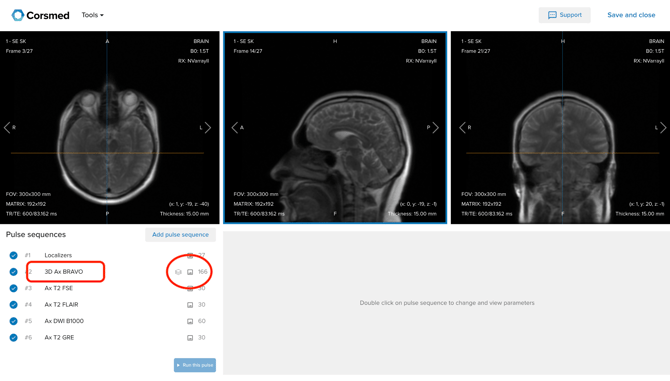
This article explains which cases support MPR, how the MPR sequence works, and what constraints apply when using it for planning exercises.
Which cases support MPR?
The table outlines all current clinical cases and their MPR availability. Where MPR is available, the 3D mother sequence that enables it is also listed.
| Clinical Case | MPR Available | 3D Mother Sequence |
|---|---|---|
| Abdomen - Dynamic (Healthy) | Yes | WATER 3D Ax LAVA Flex BH |
| Ankle (Pathology) | Yes | 3D Sag T2 Cube |
| Brachial Plexus (Healthy) | Yes | 3D Cor T2 Cube |
| Brain (Pathology) | Yes | 3D Ax BRAVO |
| Brain - Mets (Pathology) | Yes | 3D Ax BRAVO |
| Brain - Multiple Sclerosis (Pathology) | Yes | 3D Sag T2 FLAIR Cube FS |
| Brain - Pediatric (Healthy) | Yes | 3D Ax BRAVO |
| Brain DTI (Healthy) | Yes | 3D Ax T1 BRAVO |
| Brain MRA/MRV (Pathology) | Yes | 3D Ax BRAVO |
| Brain Perfusion DSC (Healthy) | Yes | 3D Ax BRAVO |
| Brain/Temporal Lobe/Spectroscopy (Pathology) | Yes | 3D Ax BRAVO |
| Breast (Pathology) | Yes | WATER 3D Ax VIBRANT Flex |
| Breast (Pathology): Legacy | Yes | WATER 3D Ax VIBRANT Flex |
| Breast fast protocol (Pathology) | Yes | WATER 3D Ax VIBRANT Flex |
| Breast fast protocol: Legacy | Yes | WATER 3D Ax VIBRANT Flex |
| Breast Implants | Yes | WATER 3D AX DIN ISO 1mm |
| Elbow (Healthy) | Yes | 3D Sag CUBE T2 |
| Gynae Pelvis (Healthy) | Yes | AX T2 Cube |
| IAC (Healthy) | Yes | 3D Ax T1 BRAVO |
| Knee (Pathology) | Yes | 3D Sag T2 Cube |
| Lumbar Plexus (Healthy) | Yes | 3D Cor T2 Cube |
| Lumbar Spine (Pathology) | Yes | 3D Sag T2 Cube |
| Neck Soft Tissue (Pathology) | Yes | WATER 3D Cor LAVA Flex |
| Orbits (Pathology) | Yes | 3D Ax BRAVO |
| Pituitary Gland (Pathology) | Yes | 3D Ax T1 FSPGR FS+C |
| Prostate (Pathology) | Yes | 3D AX T2 Cube |
| Shoulder (Healthy) | Yes | 3D AX Cube T2 |
| Shoulder 2 (Healthy) | Yes | 3D Ax Space PD FS |
| Wrist (Healthy) | Yes | 3D Cor Space PD FS |
| Ankle (Healthy) | No | — |
| Bony Pelvis (Pathology) | No | — |
| Brain CSF (Healthy) | No | — |
| Cardiac (Healthy) | No | — |
| Cervical Spine (Pathology) | No | — |
| Dog Elbow | No | — |
| Dog Spine | No | — |
| Fetal (Healthy) | No | — |
| Foot (Pathology) | No | — |
| Gynae Pelvis Dynamic (Pathology) | No | — |
| Hips (Pathology) | No | — |
| Legs with MRA/MRV Contrast (Pathology) | No | — |
| MRCP (Healthy) | No | — |
| MRCP (Pathology) | No | — |
| MRCP 2 (Pathology) | No | — |
| MRCP Pediatric (Pathology) | No | — |
| Neck MRA/MRV TOF CEMRA Fluoro Trigger (Healthy) | No | — |
| Run-off MRA non-contrast (Healthy) | No | — |
| Shoulder (Pathology) | No | — |
| Supra aortic branches - carotids MRA/MRV Contrast (Healthy) | No | — |
| Thoracic angio pulmonary aorta (Healthy) | No | — |
| Thoracic Spine (Pathology) | No | — |
| Thoracic Spine 2 (Pathology) | No | — |
| TMJ (Healthy) | No | — |
| TMJ (Pathology) | No | — |
| Wrist (Pathology) | No | — |
How the MPR sequence works
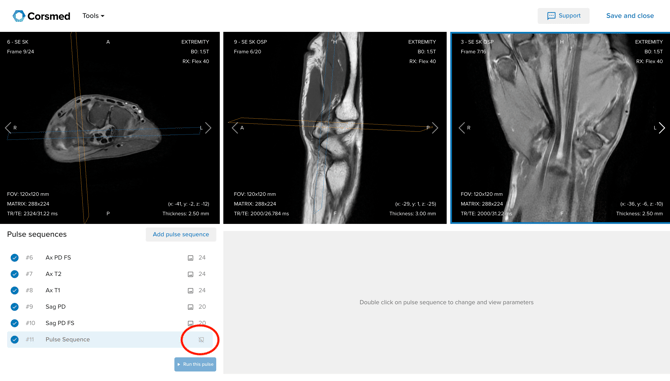
When MPR is available, a generic planning sequence can be added to the protocol. This sequence does not have a fixed pulse sequence type, it carries no GRE, TSE, or other sequence label. Instead, it inherits the acquisition parameters of the 3D mother sequence and allows you to reformat the volume in any orientation.
When MPR is not available, the generic planning sequence won’t produce any image.
Parameters you can adjust in the MPR sequence
- Field of View (FOV)
- Matrix size
- Number of slices
- Slice thickness
- Slice gap
- Foldover direction
- Multi-stack planning (adding additional stacks)
Parameters you cannot change
The MPR sequence does not allow modification of contrast weighting, flip angle, TR, TE, or any other pulse sequence parameters: these are fixed by the parent 3D acquisition.
Understanding resolution constraints
The MPR sequence cannot exceed the spatial resolution of the 3D mother sequence.
The reconstructed images are derived from a pre-acquired volumetric dataset. The voxel dimensions of that dataset set a hard floor on the achievable resolution in any reformatted plane.
Example: If the 3D mother sequence was acquired at 0.91 × 0.91 × 6 mm, the MPR sequence cannot produce images with voxels smaller than 0.91 × 0.91 × 6 mm. Attempting to set a finer resolution will not yield additional detail — the underlying data simply does not contain it.
You can, however, set the MPR sequence to use lower resolution (larger voxels) than the mother sequence, for example, to explore the effect of coarser imaging on diagnostic quality, or to practice parameter trade-offs within a planning scenario.
Summary
| Direction | Allowed? |
|---|---|
| Resolution coarser than the mother sequence | Yes |
| Resolution equal to the mother sequence | Yes |
| Resolution finer than the mother sequence | No, it goes beyond resolution of parent DICOM data. |
Practical Use in Planning Exercises, with pathology
MPR-enabled cases are well suited for:
- Practising multi-planar stack planning from a single 3D acquisition, often in the context of pathology
- Exploring how FOV, matrix, and slice geometry affect image coverage and resolution, testing it on images with increased realism.
- Demonstrating the trade-off between in-plane resolution and slice thickness.
- Understanding foldover (phase encode) direction and its effect on aliasing in reformatted planes
- Planning multi-stack acquisitions across different anatomical orientations
They are not intended to simulate a full sequence acquisition with modified contrast or sequence timing for that, use the standard simulator models in the sandbox on the Dashboard.
For questions about specific cases or discuss how to input your own additional MPR-compatible protocols, contact the Corsmed support team at support@corsmed.com.