![corsmed_no_clear_space_@16x-1.png]](https://help.corsmed.com/hs-fs/hubfs/corsmed_no_clear_space_@16x-1.png?height=40&name=corsmed_no_clear_space_@16x-1.png)
Open your achievements
- From the Dashboard, click your profile icon in the top-right corner.
- Select Achievements from the dropdown menu.
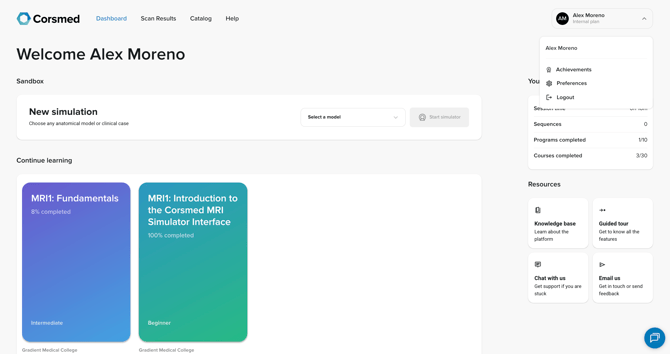
Explore your achievements
Your Achievements page highlights your hard work and learning milestones. Here, you can:
- Share your profile
- Create a PDF of your achievements, such as certifications
- Create a progress report
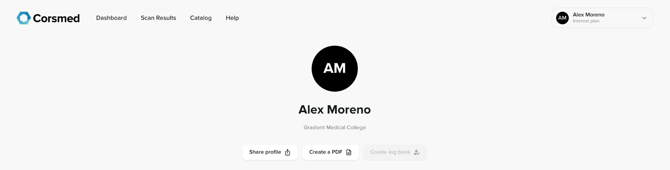
General statistics
Your achievements page includes detailed stats about your learning activity, such as:
- Account age
- Simulation time
- Total logged time
- Number of sequences run
- Scan time IRL (in real life)
- Planning time
- Questions answered
These statistics help you understand how much time and effort you’ve invested in developing your MRI skills.

Certifications
- Scroll to the Certifications section to view the certificates you’ve earned.
- You earn one certificate for each program you successfully complete.
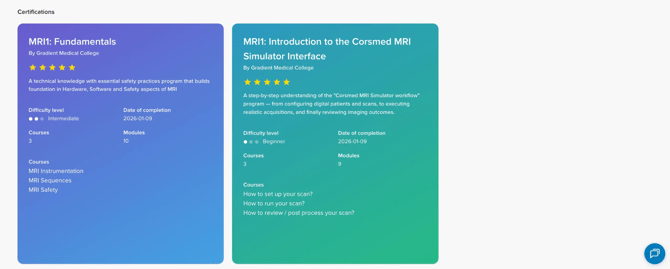
Each certificate includes key information, such as:
- Program creator
- Star rating
- Difficulty level
- Date of completion
- Program time
- Scanning time equivalent
- Courses included
- Other key statistics
Conclusion
You've learned how to access your Achievements page, view your progress, download certificates, and share your accomplishments with others.